Table of contents
Most people don’t talk about it openly, but the meeting load in a typical week has gotten out of hand. Managers now sit through roughly 13 hours of meetings every week. That’s a fifth of the workweek gone before anyone touches real work. Atlassian found something similar: 78% of employees say they’re in so many meetings that it’s hard to get anything meaningful done, and more than half end up working late to compensate.
While some folks grind through every call, younger employees have started doing something different. By 2025 a noticeable number of people had stopped showing up to smaller meetings. They let an AI notetaker fill them in afterward. That shift says plenty about the state of meeting notes. People are tired of scrambling for details and want a calmer way to keep everything organized without losing the meaning of the conversation.
The real tension is simple: staying fully present in a discussion while also trying to produce effective meeting notes is harder than most of us admit. Knowing the best way to take notes during a meeting, isn’t obvious when the conversation is moving fast and expectations are high.
Teams need a way to make taking effective meeting notes feel natural, not like extra admin. A way to handle the messy reality of modern meetings, the constant context-switching, and the pressure to retain everything.

Why Note Taking Methods Matter
Most meetings aren’t terrible because of the meeting itself. The real trouble starts after everyone leaves. People remember different things, action items get fuzzy, and the next meeting ends up covering half the same ground.
There’s research behind this mess, one study in early 2025 found that over 90% of employees feel a kind of “meeting hangover” after certain calls. You’ve probably felt it: that drained, slightly irritated feeling where you know you talked for an hour but still can’t say what actually got decided.
A big part of that comes from the fact that most meetings aren’t set up to land clearly. Only 37% use an agenda, and roughly the same number end with a real decision. When there’s no structure at the start, the notes tend to reflect that: half-finished bullets, missing deadlines, or action items that sound like suggestions.
For remote and hybrid teams, the problem hits harder. If someone wasn’t on the call, the notes taken during a meeting are all they have. When those notes are stashed in someone’s private folder or written in a rush with no context, everything slows down. People message each other for clarifications, tasks get duplicated, and projects drift for no good reason.
Clear, organized notes don’t magically make meetings great, but they make them useful. They give people something solid to reference. They keep decisions from getting reinterpreted. They make ownership obvious without a follow-up call.

Choosing a Clear Structure for Taking Good Meeting Notes
Most people don’t sit down before a meeting and think, “I need a system.” They just open a doc and start typing whatever comes up. Later, when they look back at the mess, they realize they can’t piece the discussion together. That’s not a personal failure. It usually happens because the meeting had no real outline to begin with.
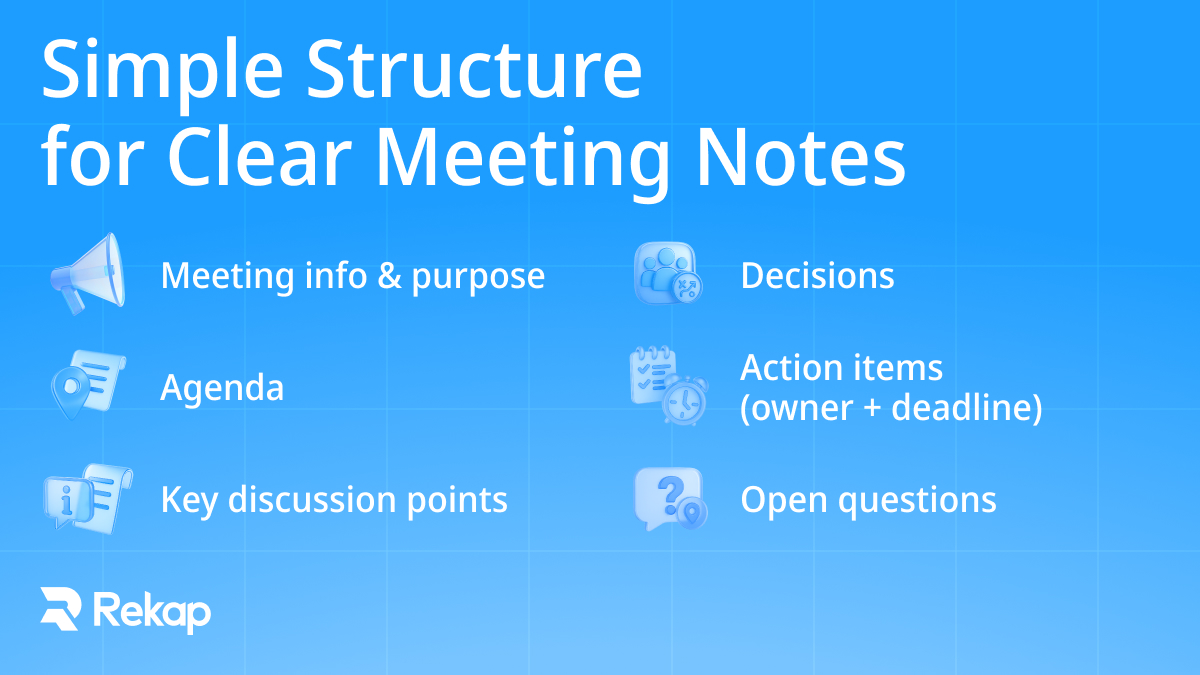
A simple setup goes a long way. It doesn’t need to be clever. It just has to be predictable, so everyone knows where things belong. A basic outline usually works:
- Meeting name, purpose, date, time, attendees
- Agenda
- Key discussion points
- Decisions made
- Action items with owners and deadlines
- Any questions that are still open or need another look
This kind of layout keeps the important pieces visible instead of buried inside long paragraphs or vague shorthand. It also makes it easier to follow meeting notes best practices without having to think about them.
Different meetings have different energies, some lean analytical, others are more exploratory, so you can still adapt parts of the format. People who like structure might prefer the Cornell method; teams that think visually might sketch quick mind-map segments. The underlying sections can stay the same either way.
When everyone sticks to a shared approach, it becomes much easier to compare notes across weeks, and far easier for an AI tool to understand what’s what, too.
How to Take Good Meeting Notes
Meetings drift in ways nobody really talks about. One person hears a deadline as flexible, another thinks it is locked in, and by the end of the week the whole plan has shifted even though nobody meant to change anything. Add in the fact that everyone takes notes in their own style. It feels harmless, but the room ends up with several different stories about what happened. None of them quite match.
A steadier rhythm makes everything easier. Nothing complicated. Just a few small steps that cut the noise. Before the meeting starts, skim the agenda, scroll the last page of notes, open the template. That’s it. Two minutes of prep so the conversation isn’t a blur of names and half-finished thoughts.
Once the meeting gets moving, it helps to stop trying to write everything down. Taking notes at meetings isn’t about making a full record. You’re really just trying to keep the parts that will matter later.
Quick Note Taking Tips for Meetings:
The useful parts are the ones people fight over later: what was agreed, what’s due, who owns it, where the risks sit. That’s the center of taking effective meeting notes, capturing the anchors, not the drift. Quick tips:
- Focus on outcomes, notes that will move things forward (agreed actions, deadlines, tasks assigned to a specific person, etc).
- Prioritize short bullet points over dense paragraphs.
- Tag action items as soon as they come up, and assign owners immediately.
- Keep notes stored in one place, where everyone can access them.,
- Review and clean your system regularly.
This is basically professional note taking, but without the stiffness. Clear enough that someone who missed the meeting can follow along without guessing at the context.
One thing people forget is that the person running the call shouldn’t be typing the notes. It’s too much to juggle. If the conversation is busy or people are making real decisions, let someone else take the notes or use an AI tool to get the first version.
Categorizing and Tagging Notes for Fast Retrieval
Most teams don’t think about tagging until they’re already digging through six weeks of notes, trying to remember which meeting the actual decision happened in. By then, it’s too late. Everything blends together. Pages of bullets, no clear thread. And without tags, even organizing meeting notes becomes a guessing game.
Tags don’t need to be clever. They just need to exist, and they need to stay consistent. The basics usually cover most situations:
- Project name
- Client name
- Department or team
- Meeting type (stand-up, strategy, retro, client call)
- Priority or status
Add the simple metadata too: date, time, who showed up, and links to any tickets or documents mentioned. Just enough structure so your future self doesn’t have to reconstruct the entire conversation from scratch.
Good tagging makes everything easier. Faster search. Cleaner handoffs. Less “wait, where was that decided?” It keeps notes taken during a meeting from sinking into a folder nobody opens again.
AI helps here, but the basics still matter. When the framework is clean, Rekap’s modules can tag things automatically with far more accuracy.
Best Way to Take Meeting Notes for Teams
Teams get into trouble when everyone keeps their own version of what happened. It creates a quiet split in how people understand the work. One person writes down a deadline, someone else writes down a discussion, someone else writes nothing at all. By the next meeting, the group is already misaligned.
Teams get into trouble when everyone keeps their own version of what happened. It creates a quiet split in how people understand the work. One person writes down a deadline, someone else writes down a discussion, someone else writes nothing at all. By the next meeting, the group is already misaligned.
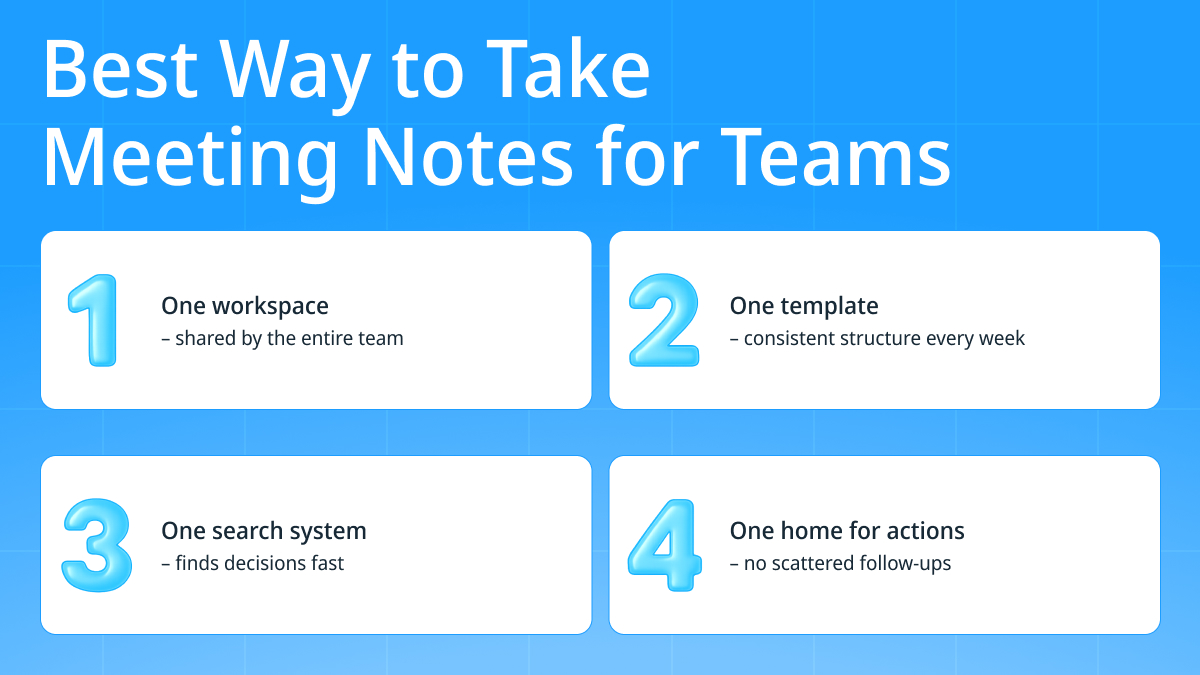
Centralizing how you organize meeting notes stops a lot of that drift. One place. One format. One spot where action items actually live. A shared workspace makes it easier for anyone to jump in, skim what happened, and move on without hunting through random docs or Slack threads. It also cuts down the tedious “does anyone remember what we said last week?” moments.
A clean setup usually looks like this:
- One workspace the whole team uses
- One template everyone follows
- One search system that actually finds things
- One home for follow-up actions, not five
Tools like Slack, Notion, and Atlassian make it easier for teams to keep notes useful. People can add comments, tag others, or update details without rewriting everything. After the meeting ends, someone can attach a document or clear up a point without creating another separate copy of the notes.
Recurring templates matter too. Stand-ups, weekly syncs, retros: they repeat. Using the same format each time saves energy and keeps patterns visible. Teams that do this don’t waste time figuring out where things go.
Also, to keep it from falling apart, someone needs to own the space. Not in a heavy-handed way, just a person who makes sure the notes get posted, the template stays intact, and stray documents don’t pile up. It makes taking good meeting notes something the whole team benefits from, not just the person typing.
Organizing Client Meeting Notes
Client meetings carry a different kind of weight. Internal calls can survive a little fuzziness, but with clients, sloppy notes turn into real consequences: missed expectations, mismatched deliverables, or that uncomfortable moment when someone swears a commitment was never made. Effective meeting minutes aren’t just polite here; it protects the relationship.
Most client-facing teams use a more structured layout because it keeps the conversation grounded and removes the guesswork later. A simple version usually includes:
- Objectives for the meeting
- A short discussion summary
- Decisions or agreements
- Deliverables
- KPIs or success criteria
- Next steps
Those sections make the call easier to follow and easier to reference later, especially when a project stretches over months or multiple teams. The small details matter too. Things like the account stage, the last touchpoint, unresolved issues, or pending approvals. Those context fields save a shocking amount of time when questions come up weeks later.
The way you store client notes matters more than people realize. If they sit in one person’s private folder, nobody else can use them and the history slowly disappears. Once everything is moved into a CRM like HubSpot or Salesforce, the whole story is in one place. Handovers are easier, and managers don’t have to chase people for updates.
This is also where multi-format capture matters. Client conversations rarely happen in just one place. A call here, a long email there, a document with edits, maybe a shared folder with context. Tools like Rekap can bring those pieces together so you’re not stitching the story manually. When everything lives in one place, organizing meeting notes becomes less about chasing breadcrumbs and more about keeping the relationship steady.
Use AI Tools to Organize Meeting Notes Automatically
AI note-takers have exploded for a reason. People are tired of splitting their attention, typing while talking, and hoping their notes make sense later. 75% of professionals now use an AI note-taker in some form. That wouldn’t be happening if meeting overload weren’t already out of control.
Still, adoption isn’t universal. About half of the people who don’t use AI tools point to privacy or security concerns. Many who do use them for taking better meeting notes admit they change how they speak when they know they’re being recorded.
The upside is obvious, though. You get:
- Real-time transcription
- Automated summaries
- Decision and action-item detection
- Searchable transcript history
- Integrations with the systems where the work actually happens
The catch is that most off-the-shelf tools still struggle with real-world complexity: overlapping speakers, domain-specific language, or decisions hidden inside comments.
This is why teams eventually outgrow basic transcription. It’s helpful, sure, but it doesn’t solve the deeper problem: turning all that conversation into structured information that moves the work forward. That’s where purpose-built, workflow-aware platforms, especially ones built around real privacy standards, start to matter.
How Rekap Helps You Organize Meeting Notes
Most teams hit a ceiling with standard AI note-takers. They’re helpful in the moment, but eventually you still end up rewriting half the summary, copying action items into three different tools, and trying to stitch together decisions from meetings, emails, and documents. That’s the gap Rekap was built for. Instead of treating notes as a static recap, it treats them as inputs for real workflows: structured, connected, and ready to move.
Automatic Structuring with AI Modules
Rekap isn’t trying to compete with transcription apps. Transcription is just the easy entry point. The real value comes from its AI Modules: small, specialized units designed to automate one workflow at a time. They run on top of advanced AI models, but the logic behind how information is interpreted, structured, and connected comes from Rekap.
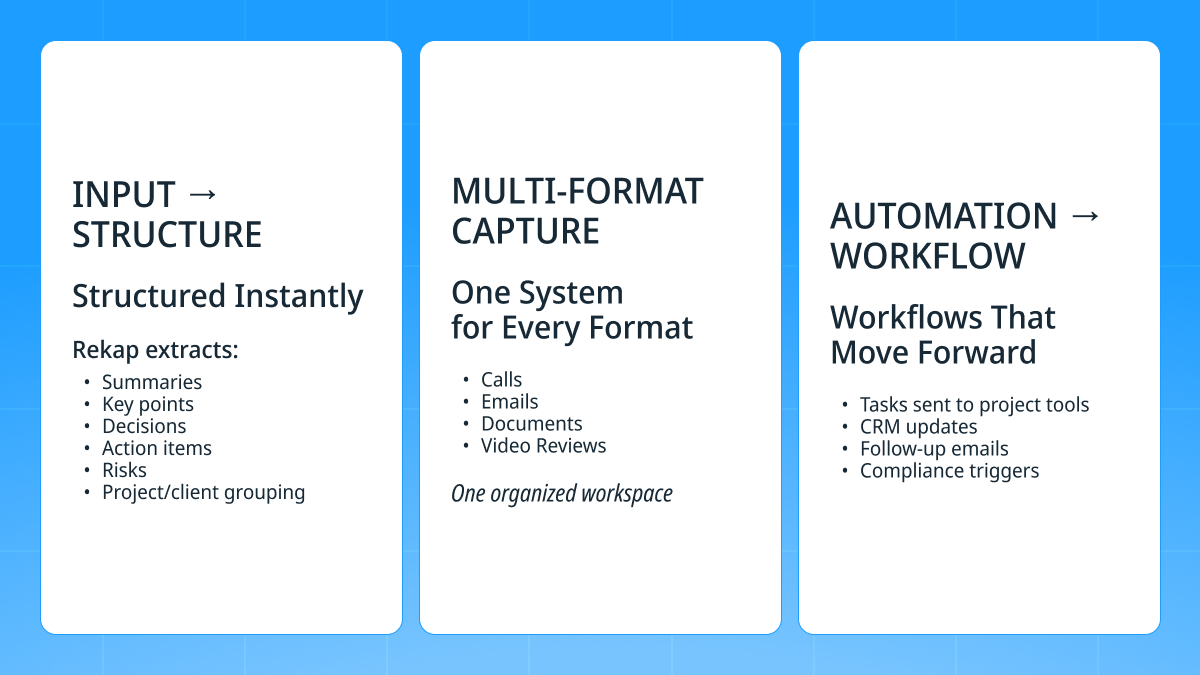
Right after a meeting finishes, Rekap breaks everything into the parts people actually rely on:
- Clean summaries
- Key points
- Clear decisions
- Action items with owners
- Risks or blockers
- Notes grouped by project or client
It does this consistently across meetings, which means less cleanup and fewer cases where someone has to “fix” the notes before sharing them.
Multi-Format Support
Most tools only handle meetings. Rekap handles the entire information trail:
- Calls (live or recorded)
- Long email threads
- Documents
- Video reviews
All of it lives in one place, tagged the same way, structured the same way. The search actually works because the system understands context, not just keywords. For client work or cross-functional teams, this saves hours because you’re not digging through inboxes or trying to remember which document contained the real decision.
Workflow Automation Beyond Notetaking
This is the point where Rekap sets itself apart. Summaries are helpful, but they do not push work forward on their own. Rekap goes further and handles the next part:
- Tasks go directly into project boards
- Client call summaries sync to the CRM
- Follow-up emails get drafted automatically
- Compliance or KYC triggers kick off the right workflow
All of this happens without forcing the team to change tools. Rekap slides into existing systems, so nothing gets reinvented.
Plus, with the growing scrutiny around AI note-takers and data handling, enterprise-grade privacy comes built-in. Rekap doesn’t just help teams organize meeting notes. It turns the information into motion, without adding more work to anyone’s plate.
Where Good Notes Actually Make a Difference
Most meetings end the same way: people say “okay, good” and then everyone jumps back into whatever they were doing before the call. The notes stay open in a tab or end up buried somewhere. Sometimes they get used. Sometimes they do not. A week later the same topic comes back because nobody remembers what was said.
But when the notes are actually clear, it’s surprising how much smoother things run. You can look back and see what was agreed without decoding half sentences. You don’t have to dig through emails to figure out who owns a task. The team stays aligned without needing extra check-ins. Small, boring things, but they add up.
The AI piece fits into this in a pretty down-to-earth way. Not as a big “future of work” thing, more like a quiet helper that pays attention when everyone else is talking over each other. Rekap does that well. It pulls out the decisions, the deadlines, the pieces that matter, and puts them somewhere accessible.
So organizing meeting notes ends up being less about the notes themselves and more about avoiding the constant backtracking that drains time. When the information is solid, the work moves forward without so many detours. That’s really the whole point.