Table of contents

If it feels like half your week disappears into meetings, you’re not imagining it. Most teams are stuck in this constant swirl of calls, catch-ups, status checks, “quick syncs” that are never quick, or convenient. Add it all up and the average person spends hundreds of hours every year in meetings, and somehow still walks out wondering, “So… who’s actually doing what?”
The time you lose after the meeting is a whole different headache. Studies keep saying the same thing: knowledge workers burn up to 30% of their week hunting for information that’s scattered across five, ten, sometimes twenty different tools. Email threads, Slack channels, shared drives, someone’s private Notion page, and that PDF someone swore was in the folder but absolutely isn’t.
For all the time we spend talking and typing, most companies are still relying on static, fragile, context-less notes. Static, fragile, context-less notes. Meeting minutes in a Google Doc. A transcription dumped into a drive. A bullet list that made sense in the moment but now reads like a ransom note. None of it actually helps the work move forward.
That’s the problem. Notes shouldn’t be dead text you file away and forget. They should do things. This is the whole point of Rekap. Yes, it can transcribe a meeting. But that’s just the entry point. What really matters is how it helps teams move forward after each discussion.

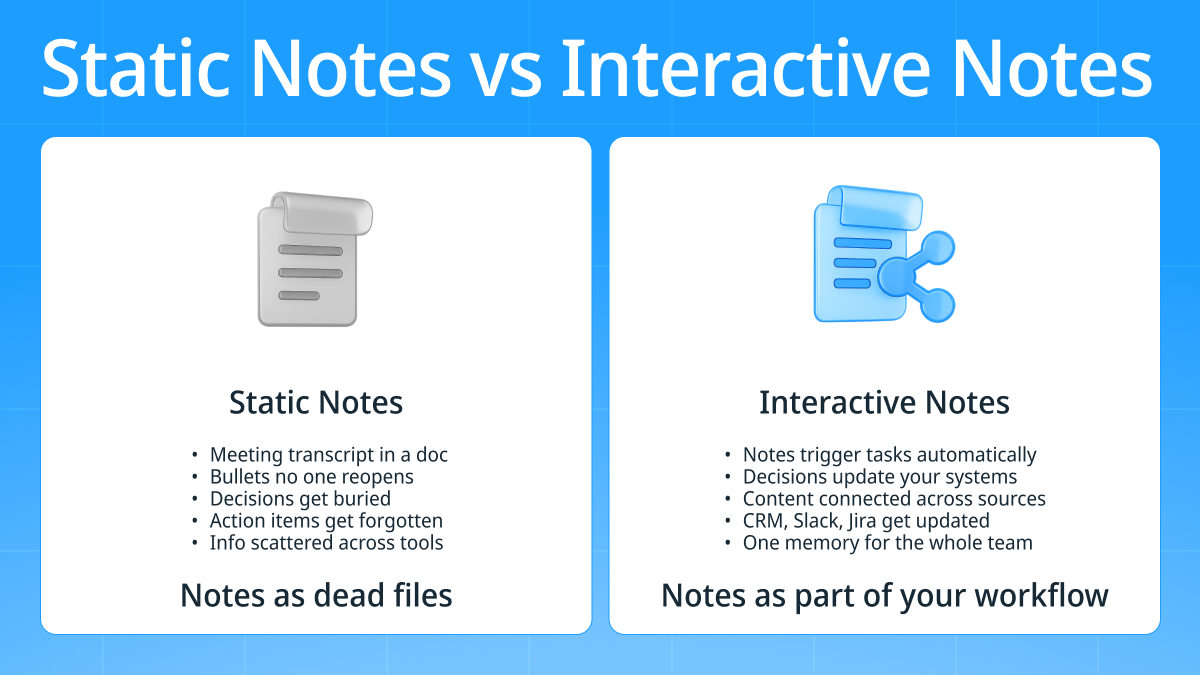
The Truth: Static Notes Don’t Drive Action
Most notes are basically just mess in a digital junk drawer. A bunch of half-formed thoughts living in Google Docs, some bullets someone typed too fast on a call, a couple of screenshots, maybe a transcript from a meeting bot that no one ever actually reads.
You’ve got handwritten pages in someone’s notebook. A doc titled “Meeting Notes – FINAL – v2 – use THIS one” floating around. A transcript sitting in a folder for compliance reasons. That’s what passes for “documentation” in most teams.
Sure, digital notes are faster to type and easier to search. Great. But that doesn’t magically translate into the thing teams actually struggle with: follow-through. Digital or not, a note doesn’t:
- update Jira,
- assign a task,
- remind you next Wednesday what you promised,
- or tell the CRM that you owe a client a proposal.
Meanwhile, people are losing hours every week to pure information scavenger hunts. One study put it at 2.8 hours per week just searching for the info you need to do your job. Another found workers losing two hours per day to the same problem. That’s before you even count the time spent in the meeting itself.
Static notes are stuck in 2009. If we want to actually move work forward, we need notes that interact, that push, that trigger things. Notes that behave like part of the workflow, not souvenirs from a call.

What “Interacting With Your Notes” Actually Means
So what does it actually mean to “interact” with your notes? It’s not some academic thing. It’s literally just this: your notes should behave like part of your workflow instead of something you politely ignore after the meeting.
Interactive notes are live. They don’t sit there waiting for you to remember them. They nudge things forward, turn a sentence into a task, push an update into the CRM, or turn a decision into an actual change somewhere.
Turning Notes Into Actions
When notes stop being static and start being interactive, they basically graduate into a different category of work tool. Suddenly, a line in your notes isn’t just a line, it’s a trigger.
Think about a normal meeting note:
“Send proposal by Friday.”
In a static doc, that’s just a sentence that 80% of people will forget existed. In an interactive system, that line instantly becomes:
- A task,
- Assigned to the right person,
- With a Friday deadline,
- And a reminder so nobody gets blindsided.
Same with:
“We’ll prioritize feature X next sprint.”
In a typical doc, that nugget gets buried. In interactive notes, it automatically updates the project board.
This is the missing link in most teams. People talk about automation like it’s some magical future, yet the real bottleneck is much simpler: your information has to be structured enough for automation tools to use it. When it is, you get the good stuff: those big time savings you see in studies. Some research shows automation can cut repetitive tasks by 60–95%, freeing teams from admin loops and giving back actual focus time. But none of that works if your notes are still trapped in a doc.
Connecting Notes Across Documents
Another big problem: your information is scattered everywhere. Meeting notes in one app. PDFs stuffed in a shared folder. Emails buried in Outlook threads. Slack messages from three weeks ago that you swear had the answer.
No shock then that 47% of digital workers say they struggle to find the information they need. Interactive notes solve this by stitching everything together. They can:
- Link across previous meetings
- Pull context from PDFs or reports
- Match new information to older decisions
- Connect email threads to what was discussed
It’s like finally having a memory that isn’t only as good as the last person who spoke up.
Letting Notes Update Your Work Systems
This is the part most people don’t realize is possible yet. When notes are interactive, they don’t just inform your workflow, they literally update it.
So instead of:
- Reading a note → opening Jira → creating a card
You get a note that updates Jira on its own. Instead of remembering to update your CRM after a meeting, your system does that work for you. Instead of writing a Slack recap, you get a tool that pushes next steps into the right channel as soon as a meeting ends.
Most people aren’t fighting this shift. Well over 90 percent of knowledge workers say automation actually makes their work easier instead of more complicated.
How Rekap Turns Raw Content Into an Interactive Deliverable
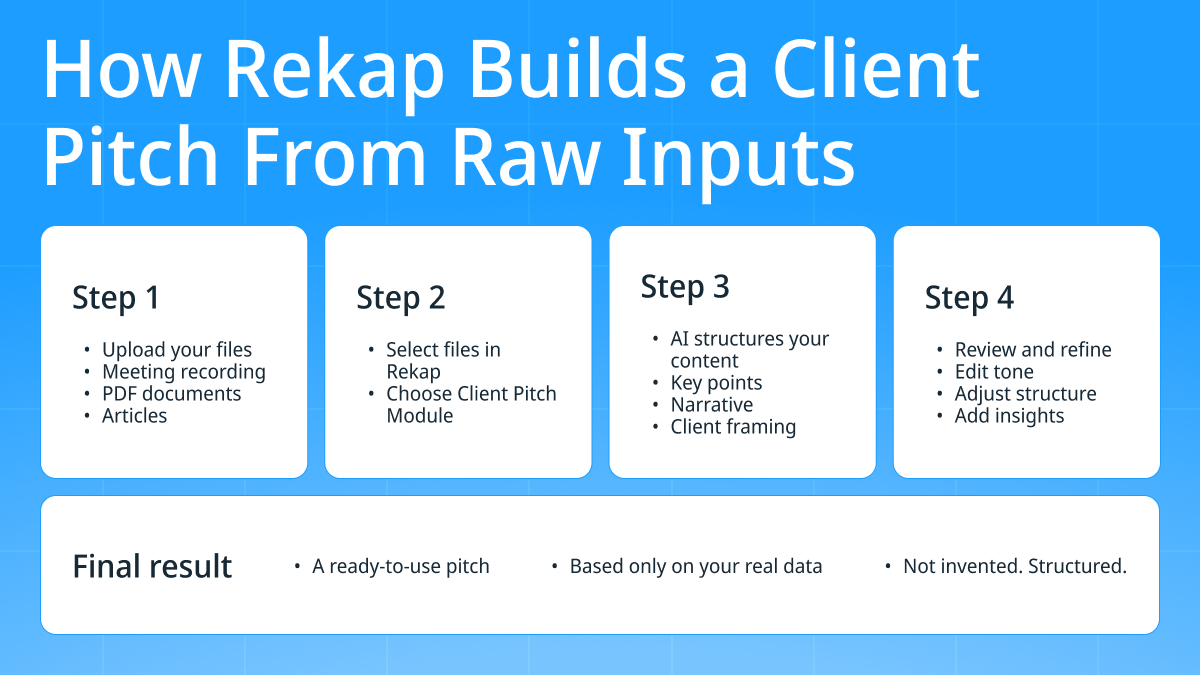
Imagine a Rekap user who needs to build a client pitch. Not a summary. Not a transcript. A pitch: something structured, clear, focused, and based on real inputs. Instead of opening a blank doc and staring at it for 20 minutes, they open Rekap.
Rekap isn’t asking for a clean draft or some perfectly formatted notes. It takes whatever inputs you already have, like a meeting recording, a PDF, and an article, and turns that messy pile into an interactive, actionable deliverable. In this case, the user activates the Client Pitch Module, which pulls from all those inputs and shapes them into a full pitch outline.
Here’s how it works.
Activating the Client Pitch Module
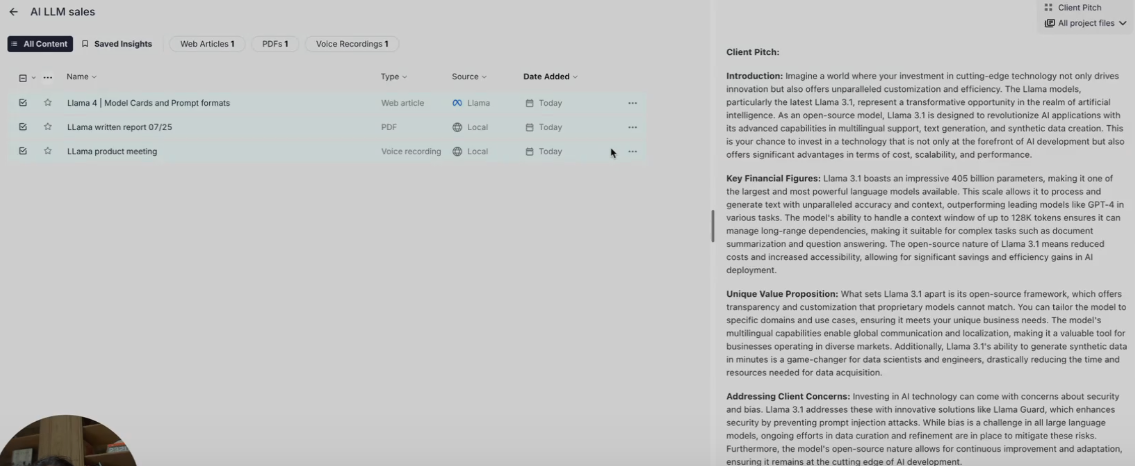
Now the user hits the button: Client Pitch Module → Apply to Selected Files
That’s it. Rekap pulls all three inputs at once: the audio, the PDF, the article, and begins stitching together a pitch outline directly from that material. No prompting gymnastics. No templates you have to fill manually.
A few seconds later, the pitch appears with fully formed talking points, client-relevant framing, product explanation, all structured cleanly. The user can even switches templates to see which narrative style works best.
Human-Led Refinement
Once you’ve got your document, you can fine-tune, adjusting tone, moving pieces around, and adding extra insights.
This is what “interactive notes” actually look like in practice:
- You choose the inputs (recordings, PDFs, articles).
- Rekap’s AI Modules transform them into a structured deliverable.
- Nothing is made up - the output is grounded in the files you selected.
- You stay in the loop, reviewing and refining the final version.
And the workflow is simple: upload → select → activate → transform → refine
This is very different from traditional note-taking or standalone transcription tools. Nothing is passive. Every file becomes part of a workflow.
Why Interactive Notes Improve Team Productivity
The funny thing about “productivity problems” is that most of them aren’t big strategic issues. They’re tiny, annoying things that pile up until everyone’s drowning. Rewriting the same notes into tasks. Copying updates from one tool to another. Digging through Slack because someone “definitely sent that link yesterday.”
Interactive notes cut straight through all of that. Instead of hours of manual admin, the work updates itself.
- Tasks don’t get lost because they’re created automatically.
- People don’t forget decisions because they’re surfaced where they’re needed.
- Teams don’t spend half their day doing detective work because information stays structured and connected.
These little gains add up fast. Studies show repetitive admin can eat more than half a person’s day, and it’s one of the top contributors to burnout. When your notes actually trigger workflows, suddenly those hours aren’t disappearing into tab hell.
How Rekap Enables Interactive, Actionable Notes
At this point, you can probably see why “notes that just sit there” aren’t cutting it. So how does Rekap actually fix the problem? Simple: it doesn’t treat notes like notes. It treats them like inputs for real work.
AI Modules That Transform Content
Rekap isn’t trying to replace your entire workflow or become the new place your team has to live in. Instead, it uses AI Modules; small, purpose-built automation tools that each handle one specific job extremely well.
A module might do transcription. Another might summarise. Another might pull out decisions. Another might build a KYC report. Another might turn three different documents into a client pitch. And here’s the important part: A module is not a model.
Rekap doesn’t sell giant AI models. It uses models (GPT, Claude, etc.) under the hood, but the thing Rekap creates is the workflow layer on top: the part that fits into business processes and the part teams actually care about.
Each module exists to save time, not create content from scratch. It transforms what you already have into something your team can act on.
Multi-Format Input
One of Rekap’s biggest strengths is the way it handles different formats without blinking. Audio? Sure. Video? Fine. PDFs? Great. Emails, docs, random files your colleague dragged in from somewhere? All good.
Everything lands in one project, gets structured, and becomes searchable. Suddenly, that “fragmentation problem” that leaves workers struggling to find information across dozens of apps, isn’t a problem anymore. Rekap pulls scattered pieces back into one workflow.
Automation Beyond Note-Taking
This is where most note tools tap out and Rekap keeps going.
Rekap’s modules can turn raw content into:
- Client pitches
- KYC or compliance reports
- Briefs
- Internal summaries
- Playbooks
- Next-step lists
And they don’t just sit inside Rekap. They can push into the tools you’re already using: Slack, your CRM, your project system, whatever you rely on.
The Future: Notes That Work for You
It’s pretty obvious how quickly note-taking has changed. We used to jot things down by hand, then we moved everything into shared docs, and now we have AI cleaning things up for us. Those steps helped, but the real shift happens when notes stop sitting there as “documentation” and start working as an active part of the workflow.
That’s why the next competitive advantage isn’t going to come from who has the most detailed notes. It’s going to come from who has notes that do something. Notes that connect meetings, emails, and documents automatically. Notes that update systems without you lifting a finger. Notes that actually remember what happened so your team doesn’t have to.
Rekap sits right in that shift. It’s not trying to replace your CRM, or your project tool, or your workflows. It’s the layer that ties them together using the information you already produce every day.
Passive notes? That era is over. The future belongs to notes that pull their weight.